


Games Like Pixel Lens: Real-time Pixel Art Filter
"Pixel Lens" is an app that turns any area of your screen into pixel art in real time — just drop a lens on top. Powered by an in-house lightweight AI, it works with anime, YouTube videos, gameplay, web browsers, and anything else shown on screen.
Top matches
Match strength key:80+65+50+<50
Pixel Lens: Real-time Pixel Art Filter
SteamAbout Pixel Lens: Real-time Pixel Art Filter
Place a lens, and watch any video turn into pixel art in real time.
■ Overview
Pixel Lens is a real-time conversion tool that overlays a "pixel-art lens" on top of your desktop.
Just drop the lens over a video or game, and our in-house lightweight AI turns the image into pixel art on the spot. Anime, YouTube, web browsers, gameplay — anything on your screen, only the area you choose.
Audio plays through unchanged, so you can add the fun of "watching in pixel art" without compromising your viewing experience.
* A DirectX 12-compatible GPU is required. Please see the system requirements below for details.
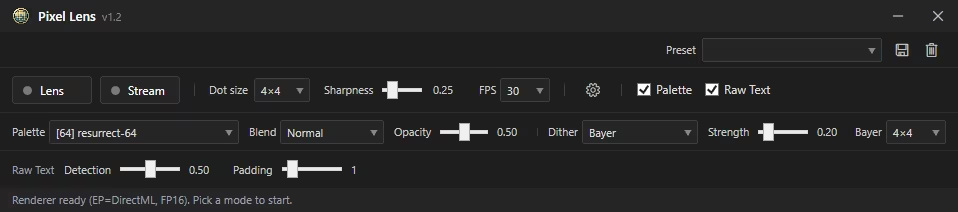
■ Features
▷ Ultra-light, fast in-house AI
The model is just 3 MB. Runs in real time at about 24 FPS on an
RTX 3060-class GPU, and about 30 FPS on RTX 3090-class hardware.
* Measurement conditions: Full HD (1920×1080) input / Target FPS = 30 / Dot size = 4
▷ Overlays on any app
Works with video players, browsers, games, and any other Windows
window or screen region.
▷ Adjustable Dot size and Sharpness
Five-step control to match your preferred pixel-art feel.
▷ Screenshot capture
Save the perfect moment in one click.
▷ Stream mode (OBS integration)
Send the pixel-art image to OBS through a virtual camera, ready for streaming or recording.
You can also record pixel-art videos to file via OBS.
■ How to use
[Lens mode]
1. Launch the app
2. Select "Lens" mode
3. Place the lens over the area you want, and adjust its size
4. Watch the pixel-art image directly
[Stream mode]
1. Launch the app and select "Stream" mode
2. Pick the window you want to capture
3. In OBS, add a "Video Capture Device" source → choose "Pixel Lens Virtual Camera"
4. Stream or record as usual in OBS
■ Tips
■ Notes
■ Support
For the full manual, please visit the official PanzerSoft website.
For feedback, feature requests, and bug reports, please use the official Discord.
Steam data © 2026 Valve Corporation. Trademarks are property of their respective owners.
All matches
Similar games to Pixel Lens: Real-time Pixel Art Filter
Finding similar games…