


Games Like TrueHands
TrueHands is a SteamVR overlay utility that renders your real hands and arms directly into VR in the color of your choice, so that chroma key/pass-through solutions can show your hands on your steering wheel, flight stick, or other controls while staying fully immersed in any VR experience!
Top matches
Match strength key:80+65+50+<50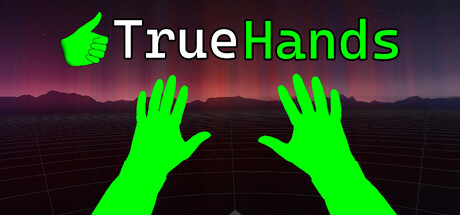
TrueHands
SteamAbout TrueHands
See Your Real Hands in VR
TrueHands brings your real hands and arms into any SteamVR experience. It renders your hands and forearms as an overlay that blends seamlessly into your VR view, letting you see exactly where your hands are on your steering wheel, flight stick, throttle, or any other control. The mixed reality effect is produced by pairing TrueHands with a pass-through capable headset and a 3rd party chroma key solution such as Virtual Desktop* or ALVR*.
How It Works
TrueHands renders your tracked hands as a solid colored overlay inside SteamVR. If desired, a 3rd party chroma key solution such as Virtual Desktop* or ALVR* then removes that color and replaces it with your real headset camera pass-through, creating a natural mixed reality effect where your hands appear directly in your VR world.
Features
Compatible With
TrueHands works great in any seated or stationary VR experience where seeing your hands adds immersion:
Enhance Your Setup
TrueHands pairs naturally with other VR overlay tools for the ultimate mixed reality sim racing or flight sim experience. Tools like OpenKneeboard* can also display your dashboard, button boxes, cockpit controls and steering wheel as overlay windows in VR, complementing TrueHands' hand visibility to give you a complete view of your real world controls and environment (when paired with Virtual Desktop* or ALVR*). With dedicated dashboard software you can even add rotation to your steering wheel overlay!
Native integration with play space pass-through windows/overlays for steering wheels, shifters, and cockpit elements is planned for a future TrueHands update, allowing your real equipment to potentially appear directly in VR without needing additional overlay tools (a 3rd party pass-through solution would still be required for the time being).
Requirements
Setup (Reading the Manual is encouraged!)
Getting started takes just a few minutes:
FAQ
-Q: What headsets are supported?
A: Any headset compatible with SteamVR will run the overlay. For the mixed reality pass-through, a headset compatible with Virtual Desktop's* or ALVR's* pass-through and chroma key feature is required. Currently only tested with Meta Quest 3.
-Q: Why do controllers appear next to my hands in some environments?
A: Some VR environments and games render controller models regardless of whether you are using hand tracking. That is the environment's own rendering, not TrueHands. Titles that hide controllers during hand tracking, or in general, will not show them.
-Q: Do I need Virtual Desktop or ALVR specifically?
A: Only for the mixed reality effect. These two PCVR streaming solutions are currently the only 3rd party streaming applications I'm aware of that offer camera pass-through mixing directly into VR environments via chroma key. This functionality is essential for TrueHands to blend your real hands into VR. Without these streaming apps you will see your hands and forearms as a solid color. There are currently no short-term plans to develop a standalone pass-through solution within TrueHands itself. TrueHands may work with other SteamVR compatible PCVR streaming apps but has only been tested with Virtual Desktop* and ALVR*. Chroma key pass-through support may not be available on others.
-Q: Does it work with any SteamVR game?
A: Yes, TrueHands works as a SteamVR overlay alongside any SteamVR game with no modifications required.
-Q: Should I launch the app before or after my game?
A: Either order works. TrueHands is designed to work regardless of launch order.
-Q: My hands appear in the wrong position, what do I do?
A: Use the Hand Calibration sliders in the settings panel to adjust position and rotation until your virtual hands align with your real hands.
-Q: Does it support finger tracking?
A: Yes, full finger tracking is supported when using hand tracking. With controllers, finger positions reflect controller input instead.
-Q: Why is there a slight delay in hand tracking?
A: Hand tracking delay is caused mostly by the headset internal tracking data processing, followed by each PCVR streaming app internal rendering pipeline, at the moment of object injection in the VR environment. TrueHands has no control over this. The delay is present regardless of connection type or network conditions. Better lighting in your play space can help improve tracking responsiveness up to a certain point. A faster encoder method such as H.264 also helps.
-Q: Can I use controllers instead of hand tracking?
A: Yes. TrueHands works with controllers, but finger positions will reflect what the controller reports rather than your real fingers, so movement is more limited. Hand tracking gives the most natural result and is recommended, and some position and rotation calibration will possibly be needed with controllers.
-Q: Does TrueHands affect game performance?
A: TrueHands runs as a background SteamVR overlay and renders its own elements independently. Some small GPU overhead is expected but impact on game performance is minimal in most cases.
-Q: Is TrueHands compatible with Non-SteamVR games?
A: TrueHands works as a SteamVR overlay, so it is only compatible with games running with SteamVR. Non-Steam games that are launched through SteamVR could theoretically work but have not been tested.
Known Issues
Hand tracking freezes when SteamVR menu is open When the SteamVR dashboard is open, hand tracking data stops being provided to TrueHands and your virtual hands will freeze in their last position until the menu is closed. This is a limitation of how SteamVR handles hand tracking data when the dashboard is active and is not something TrueHands can currently work around. Hand tracking resumes normally once the dashboard is closed.
Hand model alignment Due to the nature of the SteamVR hand/glove models and the hand tracking provided by your headset, the knuckle joints may not perfectly align with the hand model mesh in all positions. This is most noticeable in extreme finger positions and is a cosmetic issue that does not affect functionality. There are plans to implement custom models in the future which should solve this issue.
Occasional Excessive Delay
On some occasions when a VR game is demanding too many resources from your PC, TrueHands may lag behind more than expected, the problem usually solves itself after a few seconds, though in occasion the app may need to be restarted, along with SteamVR and/or the game.
Future Plans
TrueHands is developed by one person, and user feedback directly shapes what gets built next!
Native pass-through windows for physical controls
Planned support for overlaying specific areas of your physical space directly in TrueHands, allowing your steering wheel, shifters, button boxes, and cockpit elements to appear naturally in VR without requiring additional tools, when paired with a pass-through solution.
Custom hand/glove models
Custom models to fix current misalignments described in Known Issues. If you are a 3D artist interested in creating compatible hand models for TrueHands, please reach out!
Additional headset compatibility verification
Testing and verifying other hand tracking, and pass-through capable headsets beyond Meta Quest 3.
Community requested features
TrueHands is actively developed based on user feedback. Join the Discord community to suggest features and report issues!
*TrueHands is not affiliated with or endorsed by any of the programs or games mentioned or shown. They belong to their respective owners. Software shown in screenshots and video is captured by the developer for compatibility demonstration only, and any software named is mentioned for compatibility purposes only.
Steam data © 2026 Valve Corporation. Trademarks are property of their respective owners.
All matches
Similar games to TrueHands
Finding similar games…