

Games Like RigShift 3D
An application for transferring animations between different 3D models and skeletons. Inspect bone weights and transfer animations from one character to another, even when their skeletons differ.
Top matches
Match strength key:80+65+50+<50
RigShift 3D
SteamAbout RigShift 3D
RigShift is a desktop tool for viewing 3D models and transferring animations between characters.
Put simply: you have one character that already knows how to walk, run, or dance. RigShift helps transfer that motion to another character with a similar body structure.
All core operations are performed locally on your computer. Viewing models and retargeting animations does not require a cloud service, an account, or uploading files to a third-party server.
How It Works
RigShift automatically identifies the main parts of a humanoid skeleton: the head, spine, arms, legs, hands, and feet. You can always review the detected mapping and correct it manually.
Viewing 3D Models
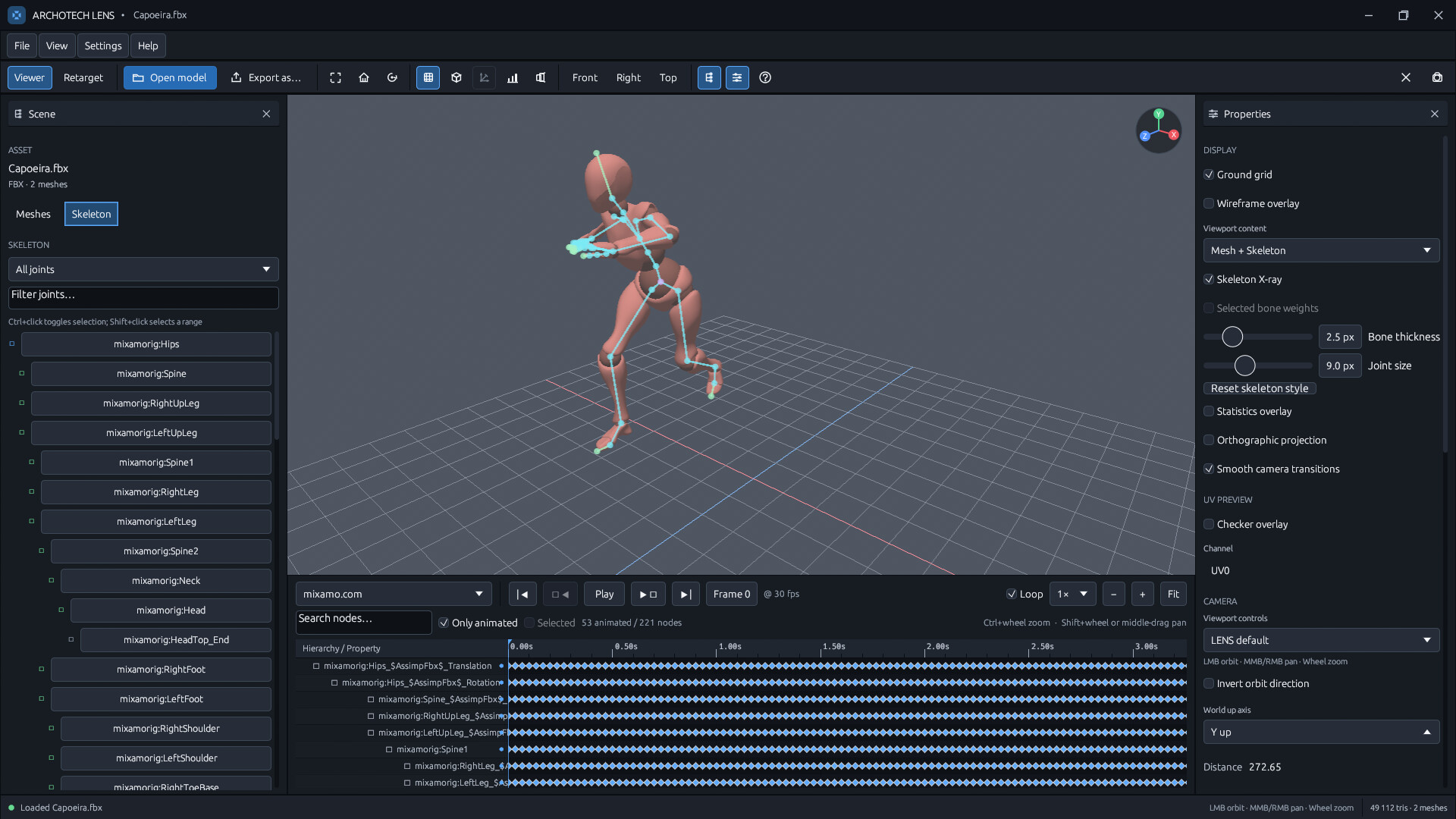
Open FBX, GLB/glTF, OBJ, STL, DAE, and other common formats. The built-in 3D viewer lets you rotate and zoom the model, switch projection modes, control the grid, and enable wireframe display.
The Scene and Properties panels show the file structure, meshes, materials, dimensions, UV channels, skeletons, and animations. Individual parts of the model can be selected directly in the 3D viewport, framed in the view, and inspected without switching to a full-featured editor.
Skeletons and Bone Weights
Inspect the bone hierarchy and select joints either in the tree or directly on the model. Skeleton X-ray mode displays the skeleton through the geometry, while a color-coded weight map helps you understand which bones influence selected areas of the character.
This makes it easy to quickly identify incorrect weights, missing bones, and other rigging issues before importing the model into a game engine.
Viewing Animations
Play embedded animation clips, adjust playback speed, enable looping, and jump to a specific frame. The Dope Sheet displays animated nodes, translation, rotation, and scale channels, keyframe positions, and the current playback position.
You can pause the animation, scrub through it manually, and inspect it frame by frame while watching the mesh and skeleton move at the same time.
Animation Retargeting
The Retarget workspace lets you open two characters and transfer motion from the Source to the Target. Automatic humanoid bone mapping speeds up setup, while the built-in editor lets you manually correct ambiguous or unusually named joints.
Independent reference poses make it possible to align characters with different starting poses and bone orientations. Comparison modes let you view the Source and Target side by side, overlaid on top of each other, or separately.
Root motion settings determine whether the character should move through the scene, remain in place, or preserve the original travel distance while accounting for differences in proportions. Foot IK analyzes contact with the ground, keeps the feet planted, and adjusts the pelvis position to reduce foot sliding.
The completed bone mapping, reference poses, and retargeting settings can be saved as a profile and reused for the same pair of characters.
Exporting the Result
The retargeted animation is baked into the target skeleton and exported as a standalone GLB file. You can preserve the original animation frame rate or choose 24, 30, or 60 frames per second.
Regular models can also be converted to supported output formats using the built-in export tools. Operations run in the background, so the interface continues to display their status, progress, and results.
Who RigShift Is For
RigShift is designed for independent game developers, 3D artists, animators, mod creators, character library owners, and users of Blender, Unity, and Unreal Engine.
The application combines model viewing, skeleton inspection, animation analysis, and humanoid retargeting into a single straightforward workflow. Instead of switching between several heavyweight editors, you can quickly open files, inspect their contents, transfer the motion you need, and save the finished result.
Steam data © 2026 Valve Corporation. Trademarks are property of their respective owners.
All matches
Similar games to RigShift 3D
Finding similar games…