


Games Like SystemChart
The new benchmark in system performance capture and understanding. SystemChart records your PC second by second, keeps the history on your own disk and charts it like a market, with a live machine map, a heat map, graded game frame rates and a Black Box that explains crashes.
Top matches
Match strength key:80+65+50+<50
SystemChart
SteamAbout SystemChart
The new benchmark in system performance capture and understanding
SystemChart records your PC second by second and charts it like a market: processor, graphics, memory, drives, network, power, applications and games, all on one timeline, with the history kept on your own disk.
Best-in-class analysis and tracing, in one beautiful platform. When something stutters, crashes or runs hot, the moment is already on the record, with everything that was happening around it.
See inside your machine
Every reading on one timeline
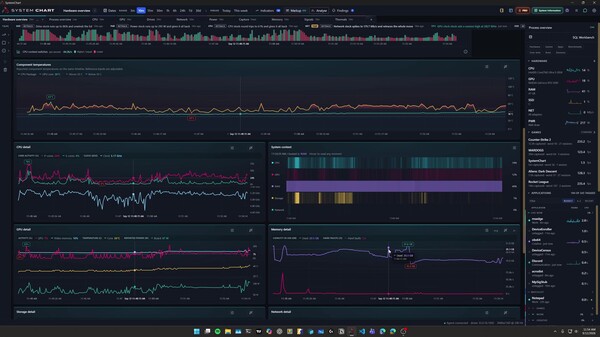
Hardware overview puts processor, graphics and memory use on one shared timeline with effort bands, and automatic markup labels the trends and ranges for you. Open any past interval, zoom from minutes to months and see which applications were doing the work. The market tape turns notable moves into headlines, and Findings expands each one into a card with a chart of the moment.
Every frame, graded
Frame times for supported games are captured alongside everything else: average FPS, 1% and 0.1% lows, stutter and smoothness for every session, with the resolution and the hardware load behind them. Game pages grade the average on the frame counter's seven tiers, from Struggling to Machine God, and an optional in-game counter shows your frame rate while you play.
A Black Box for your PC
A crash, a freeze or a restart you didn't ask for. Black Box lines up unexpected restarts, stop errors, graphics driver resets, hardware errors, app crashes and hangs, low-memory warnings and disk errors from the Windows logs with a flight recorder of the readings from the minutes before. Every incident comes with a built-in explanation: its likely causes ranked by what was captured, what to check first and how to troubleshoot it. Keep it as a case with your notes, or save it as an HTML report.
Know your hardware
Drivers lists every driver on the PC, read locally from Windows, with the vendor's own version name, its age and the maker's official download page. System Rating turns your processor and graphics card into one score, from Weakling to God's Computer. And for fun, Trading, a Pro preview, turns your parts into stocks priced by their own readings and traded with virtual cash.
Ask AI, on your terms
With Pro, ask about your PC in the Claude desktop app, ChatGPT or Codex, or inside SystemChart with Ollama on your PC or an API key you pay for by use. Assistants read your history through SystemChart's own tools, and Black Box can have one rank an incident's likely causes against the evidence. No model or API key is bundled, and capture never needs AI.
Free and Pro
Free is the complete recorder: every supported sensor at the same capture quality as Pro, 60 days of history, the built-in pages including the machine map, heat map, Network, Drivers, Black Box, Games and System Rating, automatic markup and Findings, and CSV, JSON, chart-image and HTML incident exports.
SystemChart Pro is optional DLC planned for the Steam release. It is not yet available on Steam, and it is an ownership-based upgrade, not a subscription. Pro adds history as far back as your storage allows, custom workspaces, drawing tools and studies, Compare, game and application benchmarks, watch rules, SQL Workbench queries, weekly and monthly health reports, a desktop widget, session ranks and counter effects, six colour themes, Windows Update driver checks, AI assistants and Trading. Losing Pro does not itself delete readings or saved work.
Local by design, honest about limits
History stays on your PC, and capture needs no account. Closing the window leaves the recorder running, and diagnostic reports are sent only when you choose to send one. Readings are taken every second while the PC is active and every five seconds while it is idle; some sensors update less often. Sensor availability depends on your hardware and drivers, and optional CPU and motherboard sensors need supported hardware and explicit setup. Estimated wall power is a model, not a meter reading.
Frame capture uses PresentMon and Windows tracing permissions; game and anti-cheat compatibility vary, and exclusive-fullscreen counter coverage is not promised. Per-app network figures come from Windows network events while the Network page is open. Black Box reads only the System and Application logs, never the Security log, and starts from when recording began. System Rating is a community benchmark estimate, not a stress test. Hosted AI models receive your question and the readings used to answer it, while Ollama keeps them on your PC; Steam availability of the AI integration remains subject to content review.
Windows 11 x64. No native macOS, Linux, SteamOS or ARM64 support. SystemChart does not overclock your hardware or promise higher FPS.
Steam data © 2026 Valve Corporation. Trademarks are property of their respective owners.
All matches
Similar games to SystemChart
Finding similar games…