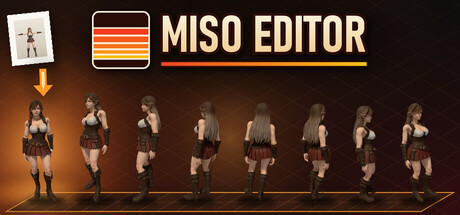
From one image to an animated sprite sheet, in minutes
Work that used to take days now takes a few minutes. Modeling, rigging, animating, and rendering all 8, 16, or 32 directions by hand used to eat up days per character. With Miso Editor, a single image becomes a finished sprite sheet in minutes.

Miso Editor is a desktop tool that takes a single character image and walks it through 3D conversion, rigging, motion, weapons, and multi-direction rendering in one continuous workflow.
The developer is making Fire Field, a 90s-style isometric ARPG on Steam, and the enemies in that game were made with this tool.
What costs money, and what never does
Everything from rigging onward runs on your own PC and is free. Rigging, motion, fitting weapons, sprite baking, and export never charge you anything, and there is no subscription.
•Have your own 3D model (GLB / FBX / OBJ)? Then you pay nothing at all. Import it and go straight to rigging. No API keys needed
•Have your own art? You don't need an OpenAI key.
•There are only two paid steps, both using your own keys and paid directly to each service, not us: 1. Drawing or editing an image inside the editor (OpenAI): about $0.07 per image at most, even at the highest quality setting. Bring your own art and this step is free. 2. Turning a 2D image into a 3D model, for characters and weapons alike (Tripo): about $0.30 per model at Tripo's current pricing. New Tripo accounts include free credits. Bring your own 3D model and this step is free.
•A sample character is included, so you can try the whole workflow for free right away
A confirmation dialog appears before every paid API call, so nothing is charged unless you press the button yourself. Spending is logged, and you can set a monthly limit.
What it does
•Easy mode: choose your own image, your own 3D model, or the sample character, and one button takes it all the way to a finished sprite sheet (a one-time setup is needed first: register your API keys and download some free motions, such as from Mixamo)
•Import a character image with a transparent background (PNG / WebP)
•Import your own 3D model (GLB / FBX / OBJ / ZIP) and skip 3D conversion entirely
•(Optional) Generate or edit the source image with the OpenAI image API (requires your own key)
•3D conversion: sends the image to the Tripo API and receives a textured 3D model (requires your own key). The model is then automatically reduced to a manageable polygon count
•Auto-rigging: adds a humanoid skeleton automatically, right on your own PC. Works on an NVIDIA GPU (about 40 seconds per character) or on the CPU with no graphics card (a few minutes depending on your CPU, same result). If the auto result is off, you can place 8 markers by hand (chin, elbows, wrists, knees, crotch) and rig again. Free
•Motion: drag in free motion FBX files (from Mixamo, for example) to apply them to the rig and preview them instantly. Free
•Weapons: give your character a one-handed weapon, a two-handed greatsword, or a shield. The weapons are baked into the sprites. Fitting a weapon is free. A weapon model is made from an image with Tripo (paid), or you can import your own weapon model for free
•Sprite baking: renders 8 / 16 / 32-direction sprite sheets. Free
•RPG Maker MZ export: also writes a ready-to-use 4-direction walking character sheet ($name.png, 3x4 frames)
•Camera presets: 2:1 isometric, true isometric, top-down, overhead, side view, first-person, and custom (save your own by name)
•Per-motion and per-character settings: frame count, duration, looping, frame size, sheet width, character height, and facing direction
Output
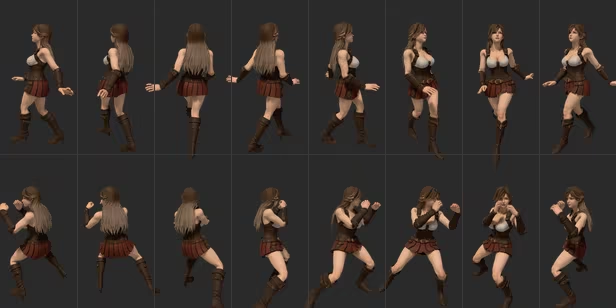
•PNG sprite sheets plus a text file describing each frame (anim.txt)
•Aseprite-format JSON frame data for each sheet (.aseprite.json)
•A separate grid sheet for each animation (PNG + JSON)
•Everything for a character in one ZIP download
•RPG Maker MZ character sheets
•Rigged 3D models (FBX / GLB), with or without applied motions
What you need
•If you bring your own 3D model, you need no paid service at all
•A Tripo API key (paid): only for turning an image into 3D, about $0.30 per model. Not needed if you have your own 3D model. New Tripo accounts include free credits. You pay Tripo directly
•An OpenAI API key (optional): only for generating or editing images inside the tool, about $0.07 per image at most. Not needed if you bring your own artwork
•Free motion FBX files: you provide these yourself (Mixamo offers them with a free account)
•No other software to install: everything needed for 3D processing and rendering is included
•For auto-rigging, either an NVIDIA GPU with 6 GB+ VRAM, or 16 GB+ of PC memory: with no NVIDIA GPU, rigging runs on the CPU instead. Manual rigging: if your PC has neither, you can rig by hand. Place 8 markers (chin, elbows, wrists, knees, crotch) on the character
•An internet connection: required when using Tripo or OpenAI
Note: Tripo and OpenAI fees are not included in the price of this software. They are charged only if you use those services, with your own keys, and you pay them directly.
Supported OS
Windows 10 / 11 (64-bit)
Who this is for
•Developers who need many multi-direction character sprites for any kind of 2D-sprite game, such as RPGs, action RPGs, roguelikes, strategy games, and shooters. Any view works: isometric, top-down, overhead, side-view, or first-person (classic sprite enemies), or any angle you set with a custom camera
•RPG Maker MZ users who want walking characters made from their own art
•Artists who can draw (or source) characters but would rather not spend time on 3D rigging and render setup
•Anyone who wants smooth 16 or 32-direction facing, not just 8
•Anyone who wants to keep a rigged 3D model alongside the sprites
Please note
•Auto-rigging is designed for humanoid characters (two legs, two arms). Quadrupeds or heavily stylized shapes may not rig well
•3D conversion quality depends on the source image and the external service's result
•Works best with: a front-facing character with legs slightly apart and fingers spread. T-pose recommended (A-pose also works)
•Tends to break: long capes, robes, or long skirts; baggy pants with the legs together; weapons or items held in the hands (add weapons later with the weapon feature instead); auras or glow effects; arms hanging down at the sides
•Wings, tails, and long hair stay attached to the body and do not sway naturally