


 48%Loose match
Pixeluvo
84%22584% positive reviews, Very Positive across 225 reviews·2014·Software
—
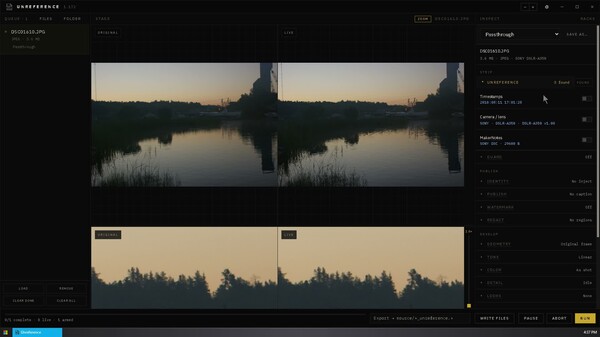


UNREFERENCE is a local desktop application for photo batching, metadata removal, and pixel-level privacy. Convert, crop, and watermark files while stripping EXIF, GPS, and camera history—or apply subtle sensor-level adjustments to disrupt tracking. Fast, private, and 100% offline.
UNREFERENCE - Image Privacy Tool
SteamUNREFERENCE is a desktop application for preparing photographs. The program has many ordinary uses, and they share one dual-paned window (before/after). The first is day-to-day work on files you already have: make adjustments to a set, rotate, apply a stylish look, compress for the web, convert a folder to JPEG or PNG, burn a watermark, or set a photograph as the desktop background with the explorer context menu. The second is EXIF data removal/injection. Before a photograph is posted, sent, or handed to a client, Unreference can take location, time, camera identity, serial numbers, MakerNotes, edit history, embedded previews, and signed provenance off a copy. The original file remains in place unless Update originals is chosen on purpose. A working photographer can strip a delivery and then write their own creator, copyright, credit, caption, alt text, keywords, and license back onto the file. The third is sensor-level augmentation. For users concerned about images being computationally matched back to a specific device, Unreference applies subtle adjustments directly to the pixel data. These algorithms disrupt stable hardware signatures, such as sensor pattern noise and demosaic regularity, reducing hardware correlation without degrading the visible photograph excessively. Presets and the window layout can sync through Steam Cloud. That sync does not include the photographs. It can be turned off per machine.
Each control removes one class of data. The inspector shows what the open file is actually carrying.
Orientation is preserved when the rest of the EXIF block is rebuilt, so a photograph does not silently turn on its side because the metadata was cleaned.
A file can report no EXIF and still carry a second copy of the picture, or a name that identifies the camera.
Removal runs first. Fields you choose to keep are written afterwards, so a caption does not restore the history that was just taken off.
The stage is two frames: the original, and the live result.
Rotation in 90-degree steps, horizontal and vertical flips, and a crop with an optional inset. Rotation and flips rewrite pixels. They are not an orientation flag left in metadata. Output size can fit the long edge to a pixel count, or cap width and height. Zero leaves the native size. A DPI value can be written as a tag. It does not resample the image.
A region is a rectangle in the frame, drawn as fractions of width and height. The pixels inside it are destroyed, not covered. There is no original underneath to recover.
Strength sets how hard the mode hits. Feather softens the edge of the rectangle. Regions are applied after geometry, so a box still lands on the subject after a crop or a rotation.
The sensor stack is optional and off at zero. It operates on pixels, not on tags. Metadata removal does not require it. Raising a slider turns that operation on. It is for cases where the concern is a faint, stable pattern in the raster itself: sensor pattern noise, demosaic regularity, JPEG block structure, dust, or a fingerprint that only matches if two files are still perfectly aligned. It reduces that correlation. It does not make a photograph untraceable, and it is not a laboratory pass or fail. The residual-energy figure in the rack is a proxy computed on a downscaled luma plane, not a PRNU score. The same stack can sit beside ordinary finishing. A file can be cropped, captioned, and watermarked with the sensor controls left at rest. Pixel washer
Pattern Experimental. These controls disturb color-filter and demosaic regularity.
Ghosts These follow compression structure, not the sensor gain map.
Optics
Drift A small geometric change so a leftover pattern cannot be registered to the original pixel grid. This is a break in alignment, not a deletion of the camera.
Re-encode from this rack Force re-encode writes a JPEG at the washer’s quality even when the main encode mode is Untouched. The point is a quantization table that is not the camera’s. Rebuild thumb is not a second hidden original: embedded thumbs from the source are already removed with the metadata strip, and the export raster is the picture.
Drop files or a folder. The active preset is applied to images that have not been edited individually. Moving a control on one photograph forks that image onto its own settings. The others keep following the preset.
An image can be matched back to the preset, its settings can be pushed onto the preset, or the current state can be saved as a new preset. Each row in the queue shows which preset it will run. Destinations:
Preview only runs the job without writing. Live Photo video is skipped. Several files can process at once. A sidecar report can be written next to the export. Overwrite, when enabled, replaces a previous export. It does not by itself replace the original.
On Windows, Settings registers an Unreference menu on the File Explorer right-click. On Linux, the same menu is installed for Files (Nautilus). A selected photograph can be processed there without opening the studio first. The macOS Finder extension is coming at a later date (when we can sign the binary). The stock menu includes:
Any preset can be pinned into that menu. Sections can be renamed, reordered, disabled, or replaced.
Further functions are in development. We are supporting Windows, Linux, and macOS at releas.
Steam data © 2026 Valve Corporation. Trademarks are property of their respective owners.
All matches
Finding similar games…
PixeluvoShares Design & Illustration · Photo Editing , adds Photo Editing84% · 225 positive reviews48%Loose match— openCanvas 7Shares Design & Illustration · Photo Editing , adds Design & Illustration76% · 546 positive reviews44%Loose match—
 openCanvas 6Shares Design & Illustration · Photo Editing , adds Design & Illustration86% · 570 positive reviews43%Loose match—
 Pixel Studio - pixel art editorShares Design & Illustration · Photo Editing , adds Pixel Graphics95% · 6k positive reviews41%Loose match—
 Energy Engine PC Live WallpaperShares Design & Illustration , adds Design & Illustration62% · 343 positive reviews41%Loose match—
 KritaShares Design & Illustration · Photo Editing , adds Design & Illustration96% · 9k positive reviews40%Loose match—
All matches
The best games like UNREFERENCE - Image Privacy Tool are Pixeluvo, openCanvas 7, openCanvas 6, Pixel Studio - pixel art editor, and Energy Engine PC Live Wallpaper.
Want picks that fit how you play? Ask GamesLike in ChatGPT