



 65%Strong match
Natural Locomotion
79%63379% positive reviews, Mostly Positive across 633 reviews·VR · Immersive
—


Play non-VR games while in VR! No need for keyboard and mouse; You can use your XR/VR controllers to simulate virtual keyboard, mouse, or even gamepad input! Create custom bindings for each controller, and play your favorite games from the comfort of VR!
NOTICE: This software is still in development. It may be a long time before there's a full release of this software. As with all software, compatibility with your device(s), games or other software is not guaranteed.
Having Issues? Please contact the developer for support via the Discord server or the Steam Community page
Warning: This software may create flashing lights that are hazardous to people with photosensitive epilepsy.

Play your non-VR games while in VR! No need for a keyboard, mouse or gamepad! You can use your XR/VR controllers to simulate key presses, mouse movement, or even gamepad joysticks! Create custom bindings for each controller, and play your favorite games from the comfort of VR!
Virtual Handheld uses industry standard input simulation to convert XR/VR controller input into virtual keyboard, mouse, or gamepad input!
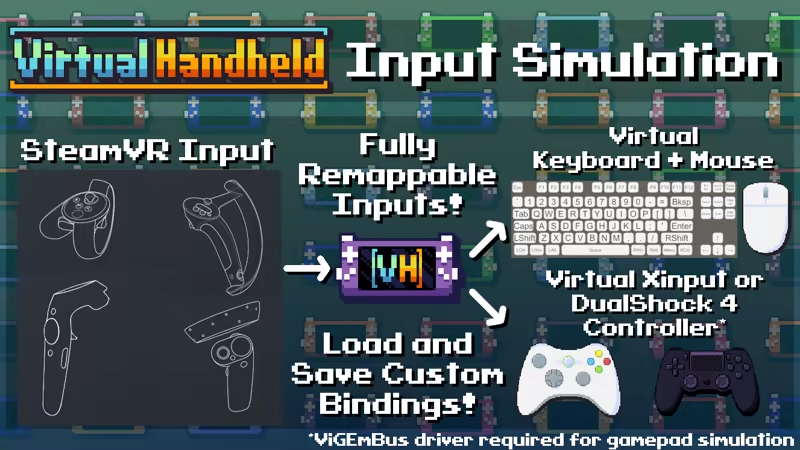

This is a SteamVR overlay application, meaning that it can be used to play games on top of other VR apps! Your controls can be blocked from interacting with other VR apps, allowing for inputs to be redirected to games running on your desktop!
By default, you can double tap your controllers together to enable or disable the handheld! You can also edit the Virtual Handheld settings from the SteamVR dashboard.

You can use the handheld's dual-screen functionality to put a different window or monitor on each screen, allowing for multitasking or dual-screen gaming!
See the "Screens" menu in the Virtual Handheld Settings to choose what sources are being captured, and configure how they are displayed on each screen.

Virtual Handheld can be used to play games that support stereoscopic 3D rendering! Games with stereoscopic 3D allow you to see depth in-game. VH splits the side-by-side image and shows each half to their respective eye, creating a sense of depth originally made for 3D glasses or 3D enabled screens.

Virtual Handheld supports one-handed use, meaning it can be played using only one XR/VR controller! The handheld will automatically be tracked to a single controller if SteamVR is started with only one controller connected.
Actions such as handheld toggle and opening the settings can be configured in the SteamVR Bindings UI.
Presets exist for one-handed controller layouts that use the AltSet "Swap" feature, which allows you to toggle between two different sets of inputs without having to hold down an extra button!
Note: Other XR/VR controller types, such as PlayStation VR2 Sense or Vive Cosmos Controllers, have not been tested by the developer and may or may not be compatible
Special thanks to Nestorboy and Alexios for helping with store page graphics!
All trademarks belong to their respective owners
Steam data © 2026 Valve Corporation. Trademarks are property of their respective owners.
All matches
Finding similar games…
 Natural LocomotionShares VR · Immersive79% · 633 positive reviews65%Strong match—
 OVR Toolkit - Desktop OverlayShares VR86% · 3k positive reviews64%Good match—
 Driver4VRShares VR , adds 6DOF62% · 1k positive reviews61%Good match—
 Virtual Desktop ClassicShares VR69% · 2k positive reviews58%Good match—
 OVR Advanced SettingsShares VR92% · 5k positive reviews57%Good match—
 XSOverlayShares VR85% · 2k positive reviews56%Good match—
All matches
The best games like Virtual Handheld: VR Gaming Overlay are Natural Locomotion, OVR Toolkit - Desktop Overlay, Driver4VR, Virtual Desktop Classic, and OVR Advanced Settings.
Match on: filter matches for Virtual Handheld: VR Gaming Overlay by tag